
 Kraken integration
Kraken Trading Journal
Add a read only futures key once and your Kraken trades sync on their own. The CSV route stays available as an alternative.
- Free for your first 25 trades
- Read only key, no withdrawal access
- No credit card required
Can you import your Kraken trades?
Yes, in two ways. The recommended one is an automatic sync through a read only futures API key: a single request returns every fill on your account, linear and inverse contracts together. Alternatively you can upload the trades export from your Kraken Futures history.
Either way Kraken delivers individual executions rather than finished positions. The importer assembles positions from them by tracking the net quantity per market and closing a round trip as soon as it returns to zero.
Automatic sync
One request returns every fill, linear and inverse contracts together.
Read only
The key reads data only, withdrawals stay without access.
Positions from fills
Partial executions are merged into a single position automatically.
Two ways to import Kraken trades
The API route is the lasting solution and keeps itself current. The CSV route works well for a one off look back, but it carries one important limitation around fees.
Route 1: read only futures API key
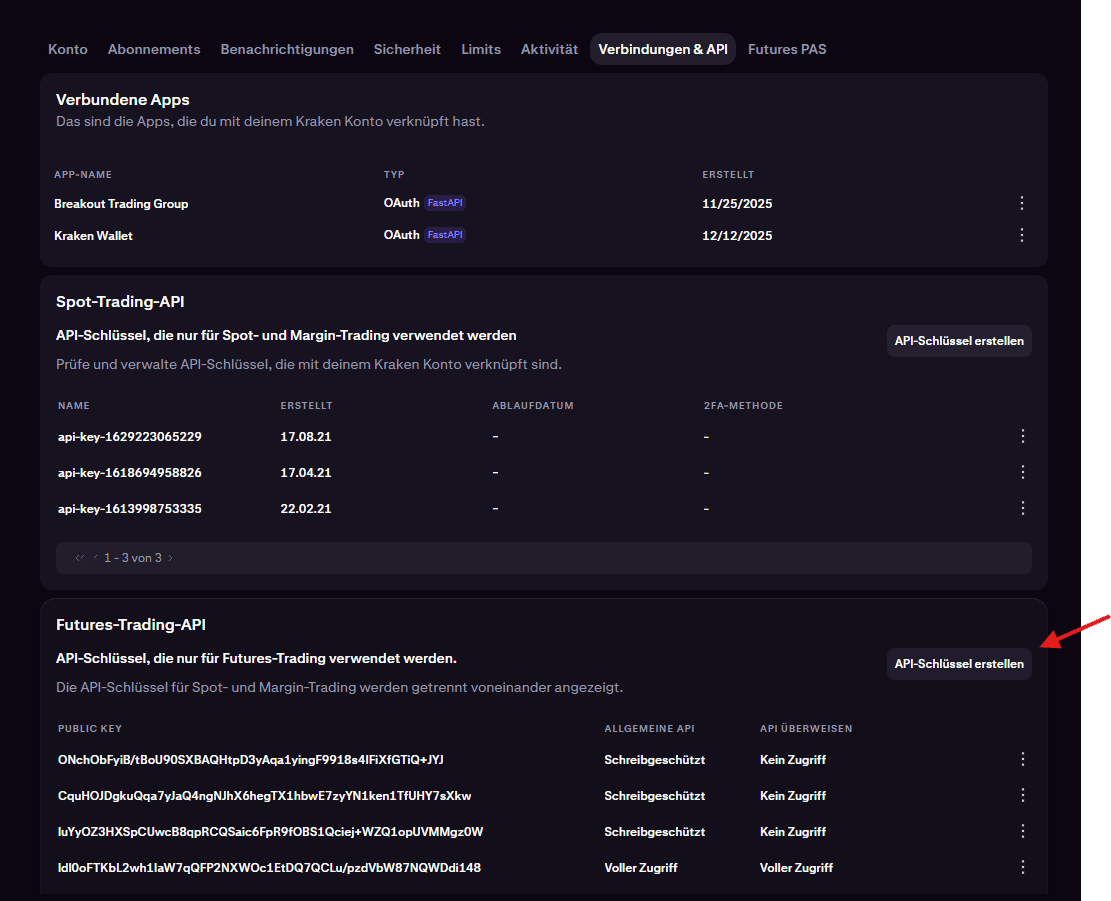
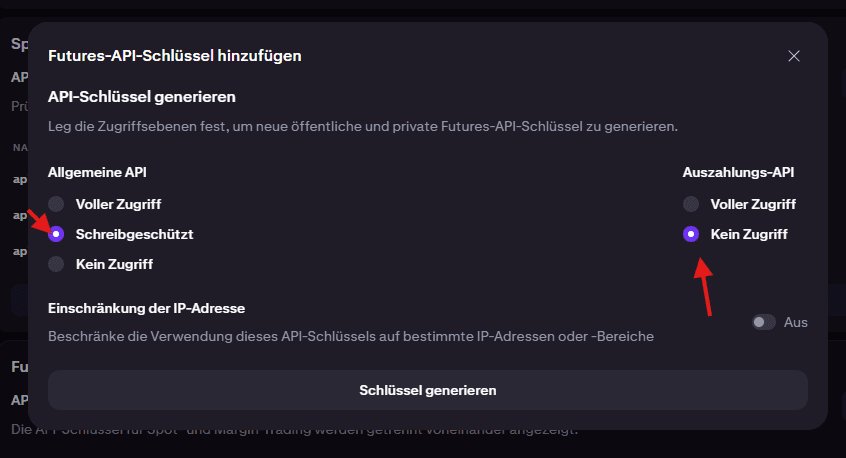
The key is created in the connections and API area of your Kraken account, specifically under the futures trading API. Choose read only there and select no access for withdrawals.
- 1
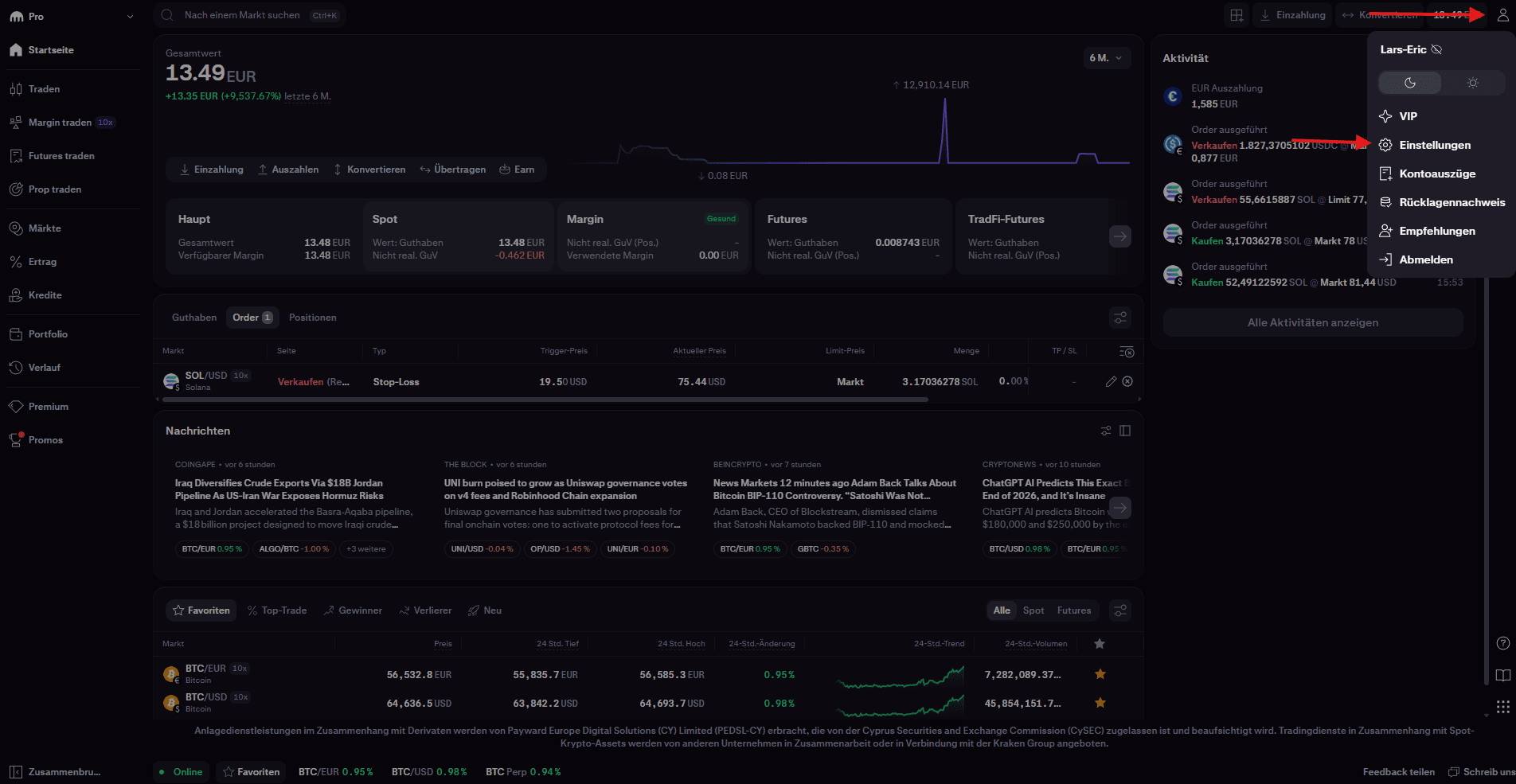
Kraken Futures Einstellungen öffnen
Klicke in pro.kraken.com auf Einstellungen oben rechts über das User Icon.
- 2
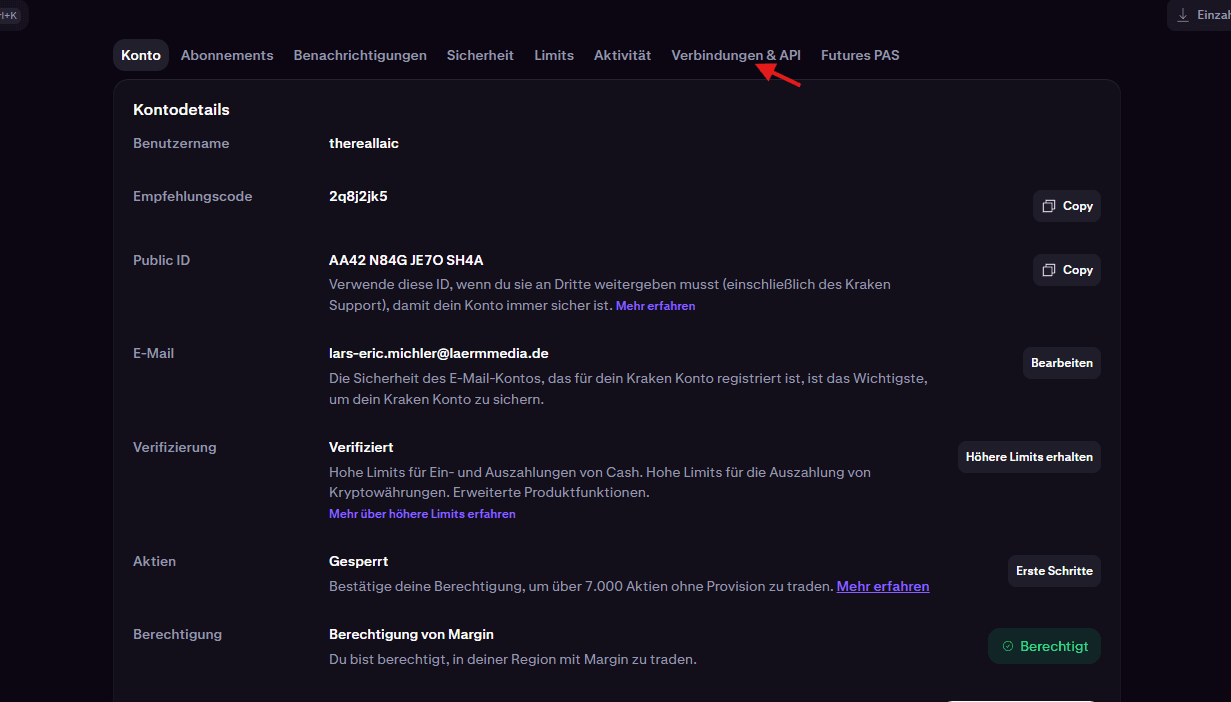
Verbindungen & API Tab öffnen
Klicke auf den Tab "Verbindungen & API".
- 3
Futures-Trading-API Tab öffnen
Klicke unten bei Futures-Trading-API auf "API-Schlüssel erstellen".
- 4
API-Schlüssel erstellen
Wähle "Schreibgeschützt" aus und "Kein Zugriff" bei Auszahlungen. Kopiere anschließend nachdem generiert wurde alle Daten hier ein.
Route 2: trades export as CSV
The export sits in your Kraken Futures history. Choosing "Trades" rather than "Orders" is essential, because the orders export contains only order lifecycle events without execution prices.
- 1
Bei Kraken Futures anmelden
Melde dich auf futures.kraken.com an und öffne den Bereich "History" (Verlauf).
- 2
Trades-Export wählen
Exportiere die Handels-Historie als CSV — wichtig: den Export "Trades" (Ausführungen) wählen, NICHT "Orders".
- 3
Vollständigen Zeitraum exportieren und hochladen
Wähle den Zeitraum so, dass Eröffnung UND Schließung aller Positionen enthalten sind (Positionen, deren Eröffnung vor dem Zeitraum liegt, können nicht zugeordnet werden), und lade die Datei hier hoch.
What Kraken delivers
One row in the export is a single fill. Only a sequence of fills makes a position, which is why some fields are calculated rather than taken over directly.
| Kraken field | Journal field | Note |
|---|---|---|
| Market | Symbol | Prefixes are stripped and XBT becomes BTC, so PF_XBTUSD turns into BTCUSD |
| Side (Buy, Sell) | Direction | The trade direction follows the first fill of the round trip |
| Price and quantity per fill | Result | Calculated from the fills, the export carries no finished result |
| Date | Open and close time | First and last fill of the round trip, milliseconds since epoch |
| ID | External ID | Unique fill identifier of the closing fill, basis for duplicate detection |
| Type | Filter | Market, limit, IoC and liquidation all count as executions |
What to watch out for with Kraken
Kraken differs from every other provider on this list in one essential respect, and it feeds straight into your numbers.
The CSV export contains no fees
The trades export lists price and quantity but neither fees nor a calculated result. The result derived from the fills is therefore a gross figure, while the API sync delivers a net one. Mixing the two routes leaves your trades not directly comparable, so pick one route for a clean history.
Export "Trades" rather than "Orders"
The orders export looks more complete at first glance, but it holds order lifecycle events such as placement and cancellation with no execution prices. No position can be reconstructed from that. Only the trades export contains the actual fills with price and quantity.
Linear and inverse contracts are calculated differently
Kraken prefixes linear contracts with PF and inverse ones with PI. On linear contracts the quantity is denominated in the base currency, on inverse contracts in US dollars. The result is therefore computed by different formulas per contract type, and for inverse contracts it is converted to US dollars at the closing fill price.
Positions without a zero crossing are missing
A position only counts as complete once the net quantity of a market returns to zero. Positions still open, and those whose opening predates the export period, are therefore skipped. Choose a generous period and the case only occurs at the very edge.
Which metrics matter in futures trading
Because Kraken delivers individual fills, one property of your trading becomes visible that many journals swallow: how heavily you split your positions. A round trip made of twelve partial fills is different trading from one made of two, even when both end on the same result.
For the evaluation itself the usual measures apply, with the emphasis on the risk side: R multiple, profit factor, and the largest drop from your account peak. In leveraged futures trading it is not the win rate that decides whether an account survives, it is the size of the losers.
If you trade on other exchanges alongside Kraken, the direct comparison is worth having. Since symbols are normalised across exchanges and PF_XBTUSD becomes BTCUSD, your Bitcoin positions from Kraken and elsewhere sit side by side in the same analysis.
Trading journal: What a trading journal does, which metrics matter and how it differs from a spreadsheet template.
API sync or CSV export
Unlike most providers, the two Kraken routes differ not only in effort but in the result itself.
| Criteria | With API sync | With CSV export |
|---|---|---|
| Fees | Included in the result, a net figure | Absent from the export, a gross figure |
| Ongoing effort | None, the sync runs by itself | A new export per period |
| Contract types | Linear and inverse in one request | Linear and inverse in the same file |
| Freshness | Keeps up on its own | As current as your last upload |
| Recommended for | Your ongoing history | A one off look back |


Common questions about connecting Kraken
Supercharge yourtrading performance
Start from zero with Momentum. Use our tools to improve your trading performance.